

Overview
When you create retailer credentials, Zinc uses those accounts to log in and place orders on your behalf. Credentials are encrypted and stored securely. Orders placed on your own account are charged the API fee only — the item is paid for by the payment method saved on that account.Saving credentials here doesn’t change how orders are placed on its own. An order runs
on your account only when it passes that account’s
short_id as
retailer_credentials_id; every other order runs on Zinc’s own accounts. See
Retailer Accounts for the two models and what each one costs.Order Locking
To prevent conflicts and ensure order integrity, managed accounts are locked during order processing. Only one order can be processed at a time per managed account. If you submit multiple orders simultaneously using the same managed account, they will be queued and processed sequentially. This prevents issues like duplicate cart items or checkout conflicts that could occur if multiple orders were placed concurrently on the same retailer account.Two-Factor Authentication (TOTP)
If your retailer account has two-factor authentication enabled, you must provide the TOTP secret key when creating or updating credentials.Using 2FA is the most secure and reliable method for avoiding account verification issues during order processing.
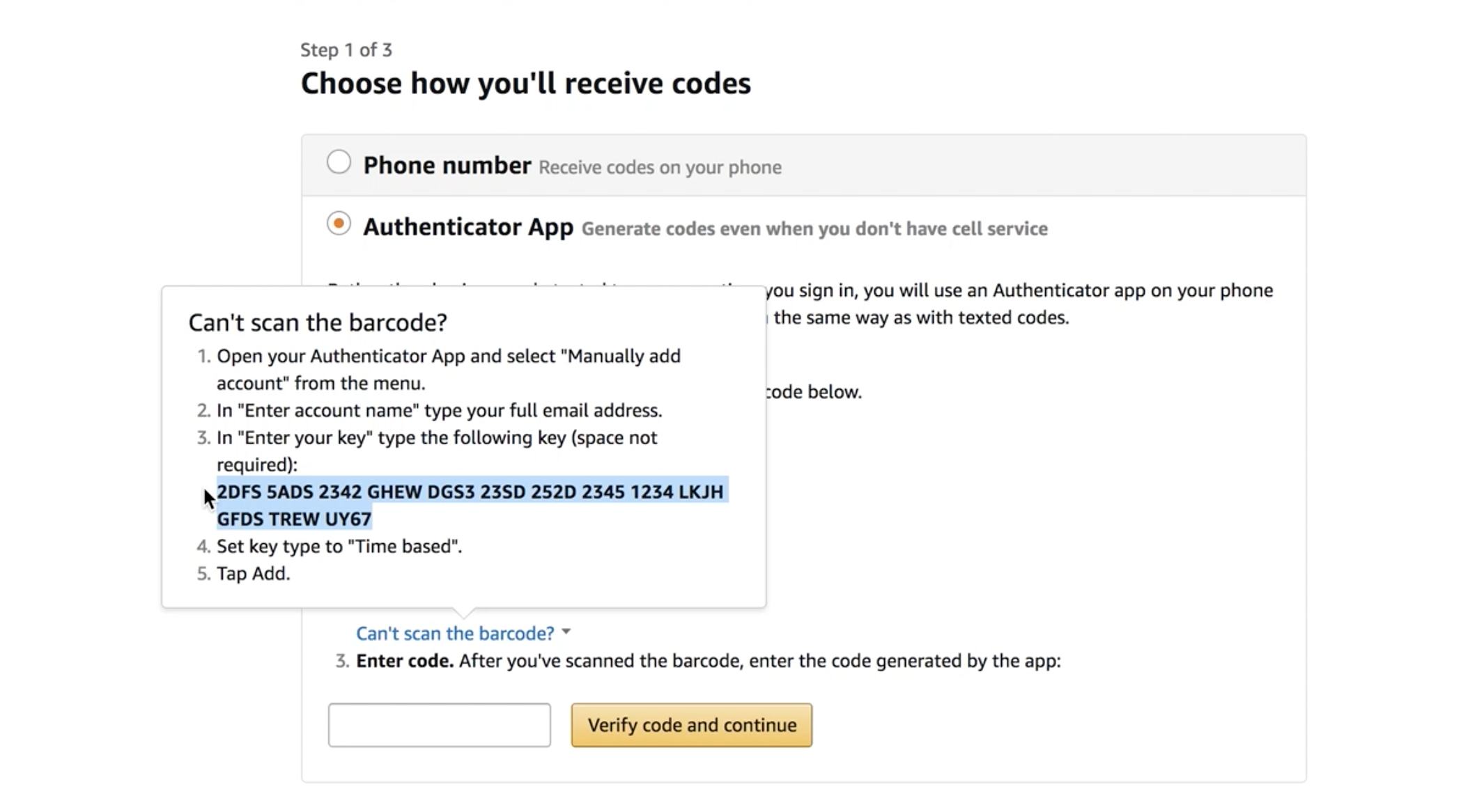
Finding Your Amazon TOTP Key
To find your Amazon TOTP secret key:- Go to Amazon’s Login & Security settings
- Enable Two-Factor Authentication
- When shown the QR code, click “Can’t scan the barcode?”
- Copy the displayed secret key (64 characters)
Email Forwarding
Retailers like Amazon may send verification codes via email during login. To handle these automatically, you can forward emails from your retailer account to a special Zinc email address. Zinc will parse incoming emails and automatically extract verification codes, so orders can proceed without manual intervention. Each managed account is assigned a dedicated forwarding address. You can find this address in the Zinc dashboard under your managed account settings.Once email forwarding is configured and verified, the
has_forwarding field on your
managed account will be set to true.Setting Up Email Forwarding in Gmail
Rather than forwarding all incoming mail to Zinc, we recommend creating a Gmail filter that only forwards emails from the retailer. This keeps your forwarding targeted and avoids sending unrelated emails to Zinc.1
Register the Zinc forwarding address
Before Gmail can forward to any address, it must be registered. Go to Settings >
Forwarding and POP/IMAP and click Add a forwarding address. Enter the Zinc
forwarding email address shown in your managed account settings on the
Zinc dashboard.Google will send a confirmation email to the Zinc address. Zinc automatically verifies
the forwarding request — this may take a few minutes. Once confirmed, the address will
appear as verified in Gmail.
2
Create a new filter
Go to Settings > Filters and Blocked Addresses and click Create a new filter.
3
Set the filter criteria
In the From field, enter the retailer’s email domain. For example, for Amazon
enter
amazon.com. This will match all emails sent from any @amazon.com address.
Leave the other fields blank and click Create filter.4
Set the filter action
Check Forward it to and select the Zinc forwarding address from the dropdown.
You can also check Never send it to Spam to make sure retailer emails aren’t
missed. Click Create filter to save.
SMS Forwarding
Not every challenge arrives by email. Retailers and card issuers often send the one-time code as a text message to the phone number on the account — Amazon sign-in codes, and the card verification (CVC) step some issuers trigger during checkout. Zinc can’t see those messages, so an order stalls on a code sitting in someone’s phone. Send them to the same place: forward the text to the managed account’sfwd-…@buy.zinc.com address using an SMS-to-email app. A forwarded text is parsed exactly
like a forwarded email, so no other setup changes.
iOS
SMS Forwarder: Forward SMS — forwards incoming texts to an email address. Paid subscription.
Android
SMS Forwarder (frzinapps) — forwards to email with per-sender and per-keyword filter rules.
Configuring the forwarder
1
Forward to the managed account's address
Use the
fwd-…@buy.zinc.com address shown for that managed account in the
Zinc dashboard — the same address you use for email forwarding.
Each managed account has its own address, so a phone that receives codes for two
accounts needs a rule per account.2
Filter by sender
Forward only the senders that carry codes — the retailer’s short code and your card
issuer — rather than every text on the phone. Both apps above support filtering on the
sending number or on keywords in the message.
3
Set a fixed subject line
Set the forwarded email’s subject to
Verification code. Zinc looks for
verification wording in the subject or body before it extracts a code, and the wording
in a text message is inconsistent — a fixed subject makes every forwarded code eligible.4
Send the message text, and put it first
Configure the forwarder to send the message body, with any sender or timestamp
metadata after it. Short codes are six digits themselves — Amazon’s US short code is
262966 —
and a six-digit number appearing above the real code can be picked up instead.Endpoints
Create Credentials
Request Fields
Response
List Credentials
Response
Update Credentials
Use theshort_id from the credentials response to update:
Request Fields
All fields are optional. Only provided fields are updated.Delete Credentials
204 No Content on success.
Response Fields
Best Practices
- Use dedicated accounts - Create retailer accounts specifically for Zinc orders to avoid conflicts with personal orders
-
Monitor account health - Retailer accounts can be locked if flagged for unusual activity. Check for
login_failedoraccount_lockederrors - Keep credentials updated - If you change your retailer account password, update it here to avoid order failures
- Enable 2FA - Two-factor authentication prevents account lockouts from verification challenges and is the most reliable method for automated ordering